

Node-RED nodes for the sysWORXX CTR-700 | Topics
Using I/Os directly from Node-RED with the sysWORXX CTR-700 IoT edge controller
The sysWORXX CTR-700 edge controller supports not only traditional programming languages such as C/C++, C#, Java and OpenPCS (in accordance with IEC 61131-3), but also graphical programming in Node-RED. Thanks to the nodes created by SYS TEC electronic, the inputs and outputs of the sysWORXX CTR-700 can be controlled directly from within Node-RED. Furthermore, data exchange with OpenPCS – i.e. the IEC 61131-3 runtime – is supported at variable level. This allows, for example, a dashboard created in Node-RED to be used as a GUI for the PLC programme.
Furthermore, all other Node-RED functionalities are also available to the PLC programme. For example, data from a PLC programme can be easily transferred to a REST-based web interface via HTTP nodes, OPC UA services can be utilised, or weather data can be retrieved from the internet with ease.
What is Node-RED?
Node-RED is a graphical programming environment that uses nodes as programme building blocks. The programme flow is driven exclusively by the processing and passing on of messages and is therefore also referred to as a flow. The programme flow is created by connecting nodes, linking the output of a preceding node to the input of a subsequent node.
Such a chain always begins with a node that generates a message based on a specific event. Such events can include, for example, a change in a digital input, the expiry of a timer, or the receipt of a message from an external server – such as the arrival of an MQTT message. At the end of such a chain there is always a node that triggers a specific action based on the received message. This includes setting a digital output or writing a value to a database. Any number of other nodes may be situated between the start and end nodes of a flow; these process the message received at their input and forward the result to the output.
Using the sysWORXX CTR-700’s I/O nodes
The I/O nodes allow direct access to the interfaces of the sysWORXX CTR-700. The following nodes and functions are available:
The following example describes in detail the basic method of using the I/O nodes. The configuration procedure is indicated by the numbering in the text and figures.
Configuration of the I/O nodes
- One of the available channels must be selected. In addition to digital inputs 0 to 15, relays 0 and
- You must specify which edge of the signal triggers the node.
- The activation behaviour can be customised as required. By default, the node is set to ‘High-active’.
- Finally, the topic to which the node responds can be adjusted.
Configuring the node for the digital output is similar:
- A channel must be selected. All 16 digital outputs are available.
- The initial state used after the programme starts can be adjusted. By default, this is set to inactive.
- The activation behaviour, which is again set to ‘High-Active’ by default, can be adjusted.
- The topic to which the node responds can be customised.
Programme flow:
The example programme is shown in the figure below. It illustrates how a digital input is connected to an output.
If a ‘true’ value is present at input DI0, output DO0 is also set to ‘true’ and the corresponding LED for the digital output will light up accordingly.
All I/O nodes are configured in the same way and can be customised individually. It is also possible to extend the programme in any way, such as inverting the input, inserting logic gates, etc.
Accessing OpenPCS variables using the IPC nodes
The IPC nodes enable access to the variables used by OpenPCS:
- openpcs_read
- openpcs_write
The following example explains how to use the nodes. Prerequisite: the “Runlight” programme must be running on the sysWORXX CTR-700. The relevant project is included as standard in the OpenPCS installation package (SYS TEC electronic Extension), which can be downloaded from the SYS TEC electronic website.
The Runlight programme writes a group of variables to the digital outputs of the sysWORXX CTR-700. Three of the variables in this group are always ‘high’, depending on the programme’s state. At regular intervals, the set of variables is ‘shifted’ by one position. This creates the running light effect.
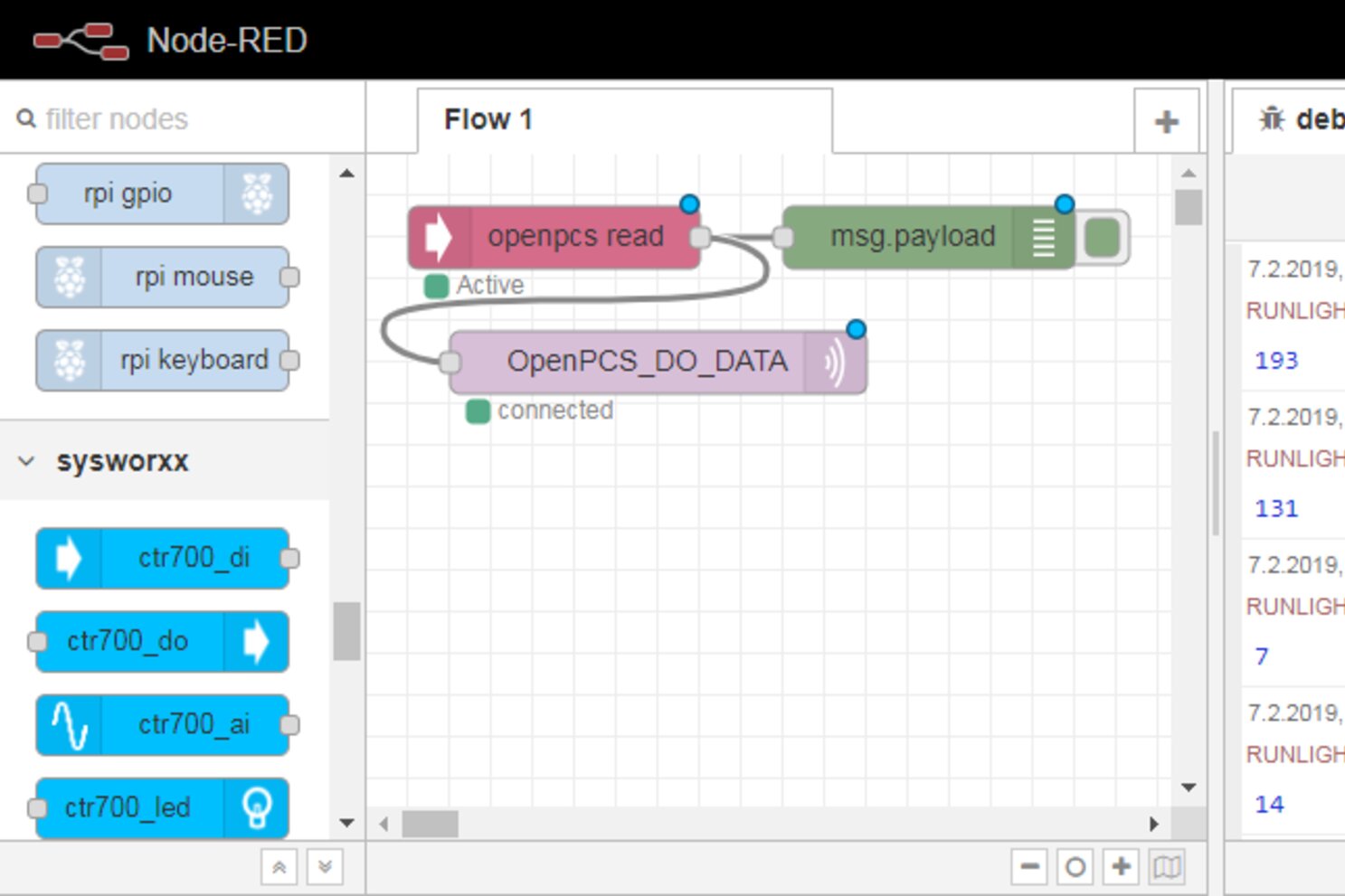
Using the sysWORXX CTR-700’s Node-RED, a variable used in the OpenPCS programme can now be retrieved via the IPC nodes. To do this, the ‘openpcs read’ nodeis used, and the variable path is entered there accordingly. This consists of the programme name and the function block in which the variable is used. In the following example, the name is “RUNLIGHT.BLEDGROUP0”. The variable reflects the constantly changing status of the running light LEDs.
The variable is read after each cycle. The topic can be set as required. The image below shows a simple flow that fulfils the described function. The debug node is used solely to visualise the data flow.
At a remote location, an application is required to analyse this data. Here, Node-RED is again used on a local PC – in principle, any software that supports MQTT can be used.
For the next step, an MQTT node is used which subscribes to the relevant topic set on the sysWORXX CTR-700. A simple converter translates the running light position into a numerical value – in this case, 0 to 7 – and passes this to a slider node.
The slider node is part of the Node-RED package ‘node-red-dashboard’ and can be installed in the same way as described above.
Within defined limits, this node behaves in the same way as the running light on the sysWORXX CTR-700. In the dashboard, the slider button moves one position further with every movement of the running light and starts from the beginning when the end is reached.
Unlimited application possibilities
Our simple example applications are intended to illustrate what the nodes for the sysWORXX CTR-700 are capable of in principle. In a real-world application, instead of a running light, the level in a liquid tank or the status of a machine signal light, for example, can be integrated. The visualisation can be implemented using a graph (available in the dashboard). The control of inputs and outputs can also be extended as required. With Node-RED, a visualisation – including that of the PLC – can therefore be generated with minimal effort, without the need for additional licences or cloud connections. Essentially, there are virtually no limits to the possibilities and freedom available during implementation.
In addition, many other freely available standard nodes can also be integrated. The following nodes were specifically tested in conjunction with the sysWORXX CTR-700:
Installation and updating of nodes
The node libraries are hosted on GitHub and, in the event of an update or subsequent installation, can be conveniently installed directly via the palette manager integrated into Node-RED:
- Open the menu in the top right-hand corner of the user interface (three horizontal lines).
- Select the ‘Manage Palette’ menu item and its sub-item ‘Install’.
- You can search for the Node packages in the search field.
The following libraries are available specifically for the sysWORXX CTR-700:
- “node-red-contrib-ctr700-io”
Enables access to the inputs and outputs of the sysWORXX CTR-700.
- “node-red-contrib-ctr700-ipc”
Enables data exchange between OpenPCS and Node-RED.
