

AI meets the field – in real time sysWORXX modules become the MCP server for AI agents
Your AI now communicates directly with the machine.
Artificial intelligence is transforming the way we analyse data, make decisions and control processes. Until now, however, a crucial piece of the jigsaw was missing: direct access to the real, physical world. AI agents can read files, query databases, access ERP and MES systems, and use web services – but can they read sensors or control actuators directly? Directly, without any intermediaries, in real time? Until now, this has not been possible.
The sysWORXX MCP Server bridges this gap. Connect your AI agents directly to the field level and unlock entirely new possibilities for intelligent automation.
The Model Context Protocol: The common language between AI and the world of tools
The Model Context Protocol (MCP) is an open standard protocol developed by Anthropic and first unveiled in 2024. It defines how AI agents – that is, AI systems that carry out tasks autonomously – can communicate with external data sources and tools.
Think of MCP as a universal adapter: just as USB-C enables any devices to be connected to one another without needing a separate cable for every combination, MCP allows AI agents to interact with any data sources and services – following a uniform, vendor-neutral standard.
What does that actually mean?
An AI agent that supports MCP can access a wide variety of resources via MCP servers:
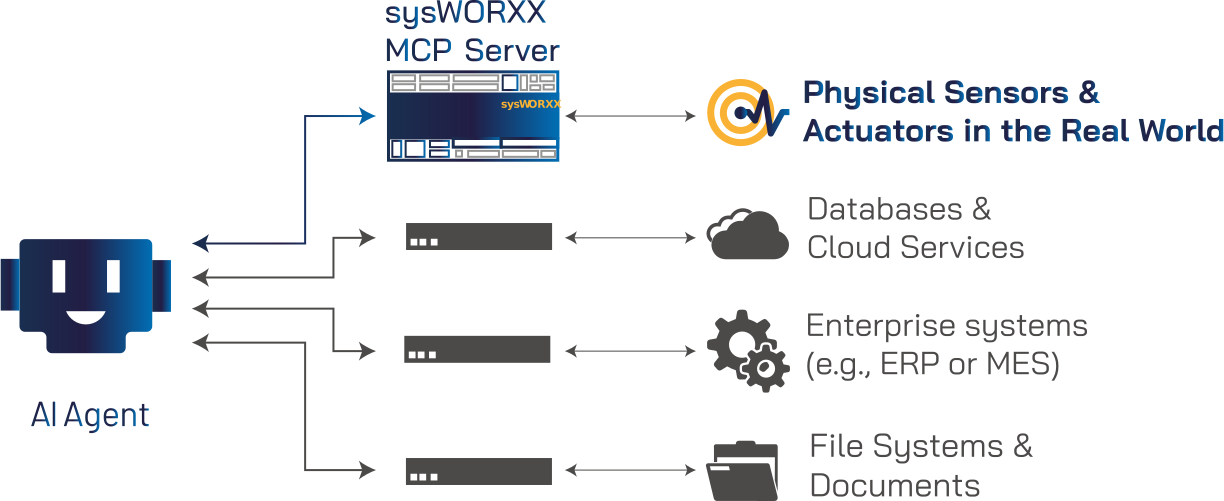
MCP is not a proprietary format belonging to a single provider, but a growing open standard that is already supported by leading AI platforms.
Where MCP is already making a difference today
MCP-based AI agents are already being used in many areas – wherever AI is required not only to provide answers but also to take active action:
- Knowledge work: searching through, summarising and organising documents, emails and databases
- Business management: Retrieving and processing data from ERP, MES or CRM systems
- Quality assurance: Analysing and evaluating measurement data from digitised testing systems
- Software development: Reading and writing code , and making changes in development environments
- Industrial automation: Monitoring machine status, diagnosing plant systems and carrying out control tasks
The problem with automation to date has been that all these applications require the relevant information to be already available in digital form – as a file, in a database or in an IT system. The physical world – sensors, switches, actuators – has so far remained out of reach for AI agents.
The sysWORXX MCP server bridges precisely this gap and enables real-time access to the physical world.
From question to answer – straight from the machine
The sysWORXX MCP server introduces two fundamentally new operating modes for AI agents in automation: interactive on-demand diagnostics and autonomous control. Both can be implemented using the same setup.
Use Case 1: Interactive diagnosis – ‘Why isn’t the machine running?’
Imagine the following scenario: An assembly line won’t start up. An employee wants to find out why quickly – without having to trawl through manuals or open several system interfaces first.


Without the sysWORXX MCP server, this would not be possible – as the AI agent would have had no way of querying the machine’s actual status. At best, it could have relied on manuals or historical data, but would not have been able to provide up-to-date information from the real-world environment.
Note on ‘real-time’: The sysWORXX MCP server always provides the AI agent with the current sensor values at the time of the query. Response times are in the order of seconds – due to the processing time of the AI model. This is entirely sufficient for diagnostic and control tasks of this kind. The sysWORXX MCP server is not a substitute for hard real-time systems with response times in the millisecond range.
Use Case 2: Autonomous control – the AI agent as an independent controller
The AI agent can not only respond to requests – it can also carry out control tasks independently and on a cyclical basis, without the need to write a control programme.

“Monitor the temperature continuously. Switch the heating on as soon as the temperature drops below 20 °C. Switch it off again once 22 °C has been reached.”

The sysWORXX MCP server reads data directly from the I/O terminal or writes it there. Quickly and without any detours.
How the configuration works – simply using a table

The I/O configuration is based on a simple CSV file. It acts as the link between the physical inputs and outputs of the sysWORXX module and the natural language environment of the AI agent.
In this file, you assign a meaningful name to each sensor and actuator – that is, the term that the AI agent and the user will later use. You also specify whether it is an input (read) or an output (write), which physical channel is involved, and what values are permitted.
|
Name |
Function |
Channel |
Value |
|---|---|---|---|
|
Screw magazine |
Read input |
DI0 |
inserted/removed |
|
Protective cover |
Read input |
DI1 |
closed/open |
|
Signal lamp |
Write output |
DO0 |
on/off |
|
Heater |
Write output |
DO1 |
active/inactive |
|
Pump output |
Read input |
Modbus |
kWh |
|
Temperature sensor |
Read input |
MQTT |
°C |
The CSV file is a simple text file – it can be edited using any text editor or even Microsoft Excel. No programming knowledge or special tools required. Simply customise it and get started.
Your sysWORXX modules as an AI interface to the physical world
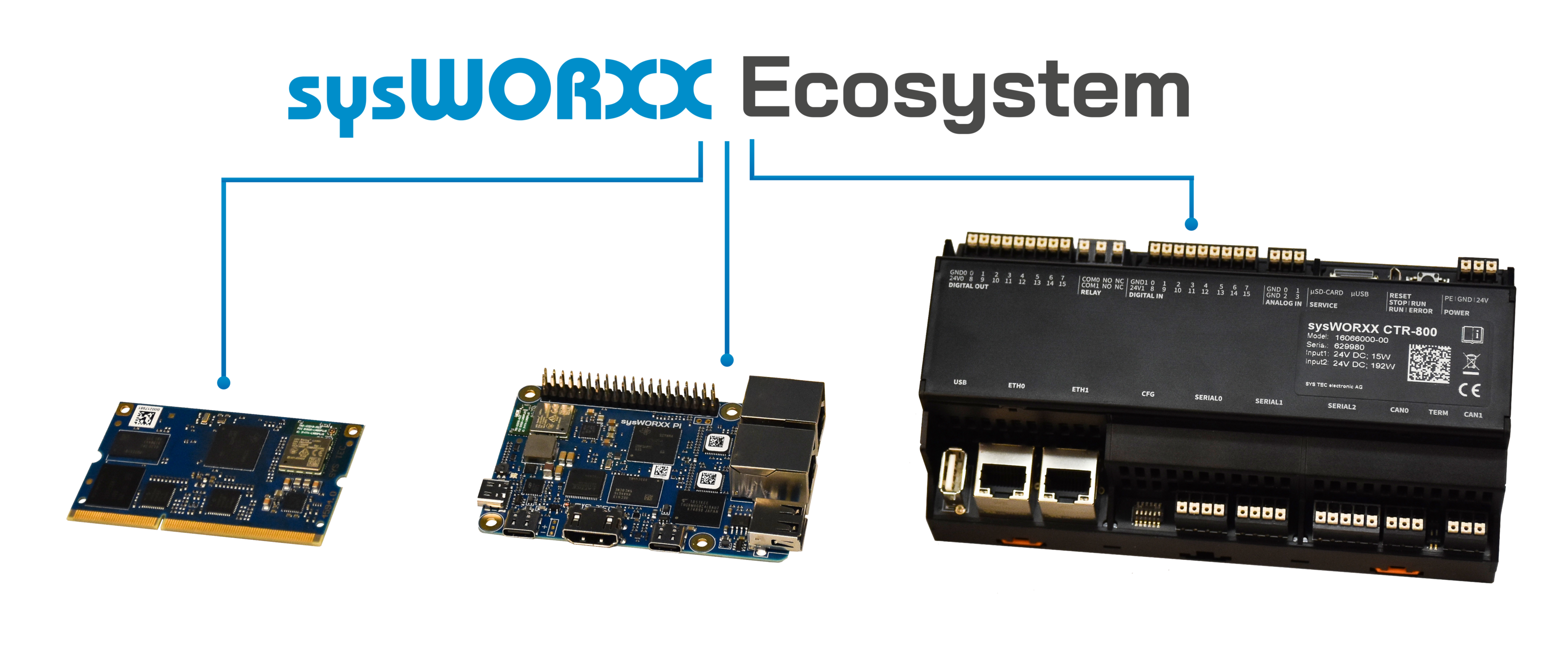
The sysWORXX MCP server runs directly on your sysWORXX modules, transforming them into a universal bridge between AI agents and the real-world automation environment. No additional server, no cloud dependency, no complex engineering.
The MCP Server can be used on all devices based on the sysWORXX technology platform. In addition to the Linux compact controllers of the sysWORXX CTR family, this also includes all customised devices built on the platform.
At a glance – the benefits of the sysWORXX MCP Server

Plug & Play – ready to use straight away
The AI agent recognises the functions provided by the MCP server and can access the configured sensors and actuators directly. No additional configuration is required on the agent side.



Open and standards-based – today and tomorrow
MCP is a growing open standard. The sysWORXX MCP server is compatible with MCP-enabled AI agents and platforms and can also be connected to self-hosted AI solutions, provided they support MCP.


Key technical specifications
|
Feature |
Details |
|---|---|
|
Compatible modules |
All Yocto Linux-based modules (sysWORXX CTR-600/800/810/850, sysWORXX Pi, as well as all custom devices based on the sysWORXX technology platform) |
|
Available I/Os |
Depends on the hardware module used |
|
Communication |
HTTP and HTTPS (both can be used individually or simultaneously; individually configurable) |
|
Authentication |
API key and/or OAuth (optional, can be enabled individually) |
|
Configuration |
CSV file (text editor or Excel) |
|
Autostart |
Yes, via systemd service |
|
AI compatibility |
All MCP-enabled AI agents and platforms |
Ready to give your AI access to the real world?

The sysWORXX MCP server is a technology demonstrator – and offers a concrete glimpse of where AI-powered automation is heading. We are convinced that linking AI agents with the physical world will be one of the key innovations of the coming years. We would like to shape this development together with you. Talk to us about your use case – we look forward to discussing it with you.
Do you have any questions? A specific use case? Or are you simply curious? We’re keen to hear about your project and would be happy to advise you, with no obligation.
Leaflets and further information
Further information on the sysWORXX MCP Server can be found in our product leaflet. This will give you a quick overview of its possible applications and technical features.
Get in touch now

Your contact person: Ronald Sieber
Department: Executive Board | CTO
Email: info@systec-electronic.comPhone: +49 3765 38600 0
