

SocketCAN + Docker = The solution | Topics
SocketCAN + Docker = The Solution
A basic understanding of Docker and SocketCAN is required to understand all the points covered in this blog. Basic knowledge will not be covered in detail here. This article offers an approach to combining SocketCAN and Docker in a stable and convenient way.
When developing highly complex embedded devices, we are often faced with the challenge of testing several CAN applications simultaneously within a single system, using different runtime environments. To date, there has been insufficient documentation or information available on this very specific topic. At SYS TEC electronic, we have taken this as an opportunity to explore the subject ourselves.
This article will therefore focus on finding a solution to this challenge using SocketCAN and Docker.
Why would one want to use SocketCAN and Docker together in the first place? SocketCAN is a collection of drivers that enables the use of CAN interfaces under Linux. However, it also offers many other services.
Docker, on the other hand, allows different aspects of a system to be isolated from one another, for example to prevent unwanted interactions between programmes or applications. It also offers a certain level of protection for the overall system, as no unauthorised access to the ‘outside’ is possible from within the Docker containers. Furthermore, it is ideally suited to creating the same application environment across a wide range of machines and devices. This simplifies the deployment of new and updated software.
Our aim is to install several Docker containers on a single device, all of which can be accessed via the host system’s CAN interface.
Our initial idea is to pass the interface itself directly into the Docker container. Typically, on PCs, the CAN interface is connected via USB. Unfortunately, this solution does not work, as the Docker containers run purely in user space. This means that the kernel is not virtualised, unlike in full hardware virtualisation (typically a classic virtual machine). Furthermore, the SocketCAN drivers are not based on libusb, so there is no way to use a USB-CAN interface within the Docker container.
A second approach is to use host networking mode or privileged mode with the Docker container. This would ensure that the container can access the host’s CAN interface. However, this still results in some undesirable side effects: advanced (i.e. root) privileges are required to set up the networking. This is not a viable alternative, as it results in the loss of container isolation. This means that the applications running in the container behave exactly as if they were running on the host system. However, this completely negates the key advantages of Docker.
The third and, in our view, best implementation option is to use virtual interfaces for the Docker containers. These are already used for TCP/IP communication between Docker containers and the host system.
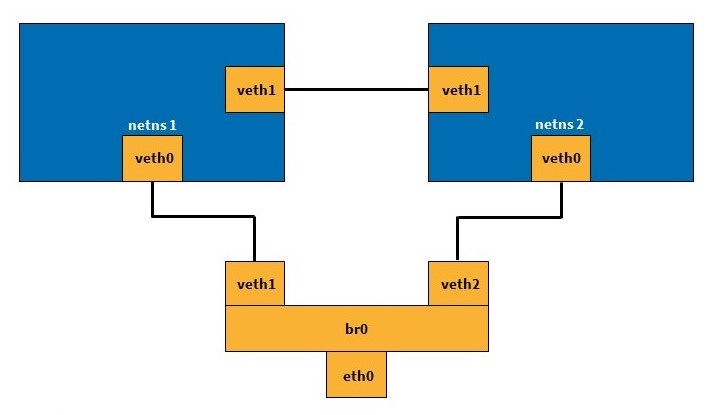
Specifically, we use vxcan for this. This is also included in the Linux kernel. Vxcan allows you to create virtual CAN interfaces and set up tunnels between them. This makes it relatively straightforward to communicate across network namespaces – for example, between two or more Docker containers. The following diagram illustrates this process. The two ‘netns’ boxes represent the different network namespaces; these could, for example, be the Docker containers in question. Via vxcan, they can communicate with one another and with the outside world using a virtual interface.
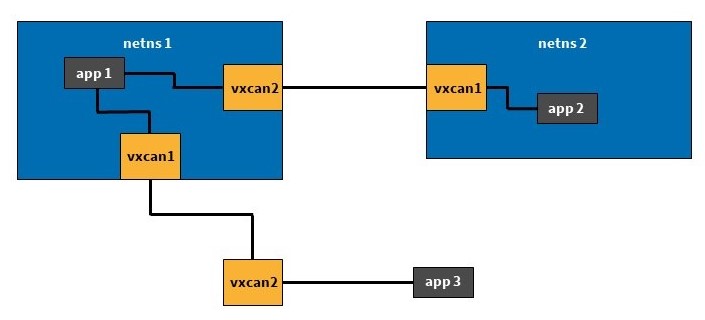
Verwendung vxcan zwischen Netzwerken
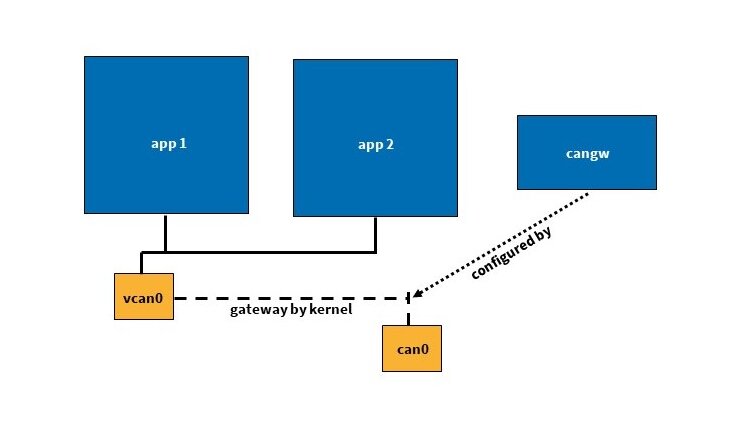
However, this is only the first step towards a solution. Whilst we now have virtual interfaces for each Docker instance, we still lack a physical connection to the device’s CAN interface. The final piece of the jigsaw here is CAN_GW. This allows physical and virtual CAN interfaces to be connected or bridged together (similar to a network bridge). Ultimately, this enables one or more virtual CAN interfaces to be connected to the physical interface on the device.
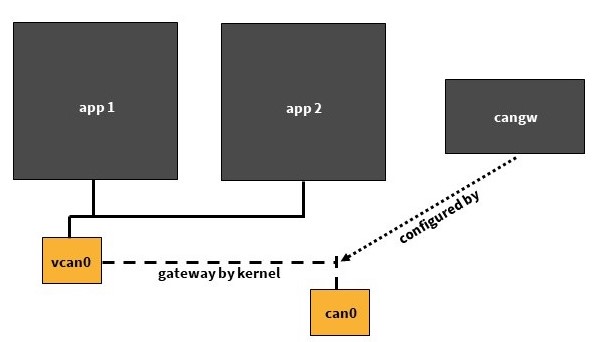
Figure 3: Tunnel with CAN_GW
This allows the CAN bus to be ‘connected’ to the Docker containers via the interface on the device. Each Docker container is assigned its own virtual CAN interface via vxcan. Using CAN_GW, the physical interface on the device can then be connected to any of the previously set up virtual interfaces. In this way, the CAN messages arriving at the device reach each individual Docker container independently of one another.
Two terminal windows are required to test our demo application. One of our sysWORXX USB-CAN modules can be used on the PC as the CAN interface. The necessary commands are as follows:
1. Terminal
docker run --rm -it --name cantest ubuntu:20.04
apt-get update && apt-get install -y can-utils
2. Terminal
DOCKERPID=$(docker inspect -f '{{ .State.Pid }}' cantest)
sudo ip link add vxcan0 type vxcan peer name vxcan1 netns $DOCKERPID
sudo modprobe can-gw
sudo cangw -A -s can0 -d vxcan0 -e
sudo cangw -A -s vxcan0 -d can0 -e
sudo ip link set vxcan0 up
sudo ip link set can0 type can bitrate 125000
sudo ip link set can0 up
sudo nsenter -t $DOCKERPID -n ip link set vxcan1 up
1. Terminal
candump vxcan1
2. Terminal
cansend can0 123#1122
What are the benefits of this procedure, which at first glance appears rather complicated?
- All systems and virtual devices are isolated from one another. This reduces ‘contamination’, and the container’s influence stops at its boundaries. At the same time, this offers a certain level of protection for the host system.
- Each Docker container has its own separate IP address, just as would be the case with a real application if it were running on a separate device.
- Reproducibility is very high. By creating a Dockerfile, the image and container can be integrated into a wide variety of systems as often as required.
- This approach is much more lightweight than creating a complete system as a virtual machine. At the same time, each VM would require its own physical CAN interface.
- It is also possible to use this solution on embedded devices, such as our sysWORXX CTR-700.
However, there are also a few drawbacks to this solution:
- It requires some manual intervention to set up the entire system.
- The use of the CAN_GW and the resulting connection of the individual networks leads to increased message overhead; however, this is hardly noticeable in modern systems.
A more detailed demonstration, complete with further explanations and information, was given by our system architect Daniel Krüger as part of the Chemnitz Linux Days. The video, including the presentation slides, can be found here.
Further information:
- Daniel Krüger, SocketCAN with Docker on Linux
- CANopen demo project
- Forwarding CAN bus traffic to a Docker container using vxcan on Raspberry Pi
- Oliver Hartkopp, Design & separation of CAN applications
- Christian Gagneraud, can4docker
- Daniel Krüger, SocketCAN – CAN driver interface on Linux
- Christian Sandberg, CANopen for Python
- Martin Willi, Kernel patch: Move device back to init netns when the owning netns is deleted
